Meet My Assistant
Customer Service Virtual Assistants
Your time is an important asset — let us help protect it. Meet My Assistant provides customer service support virtual assistants for businesses that need fast, friendly client communication without building a large in-house support desk.
- Top 1% applicants
- Time-zone aligned
- 98% retention
At Meet My Assistant, we know exceptional customer service is the backbone of lasting relationships. Our customer service VAs keep responses timely, tone on-brand, and handoffs clean so you can focus on core operations while clients feel heard.
Strengthen your customer relationships
With Meet My Assistant’s Customer Service Support, customers feel valued and heard. We handle day-to-day client interactions while you grow the business.
What our customer service VAs can help with
- Inbox and ticket triage
- Client follow-ups and status updates
- Appointment scheduling and reminders
- CRM notes and handoffs
- Friendly, brand-aligned communication
- Escalation routing when a human decision is required
Outcomes you can expect
- Faster first responses and fewer unanswered threads
- More consistent tone across email, chat, and CRM notes
- Cleaner handoffs to sales, ops, or leadership
- Flexible coverage as volume rises or dips
- A support layer that protects brand trust while founders stay focused on growth
Customer experience breaks when inboxes pile up. Our customer service VAs keep communication moving with clear escalation paths, so urgent issues reach you and routine questions get handled promptly.
Channels We Cover
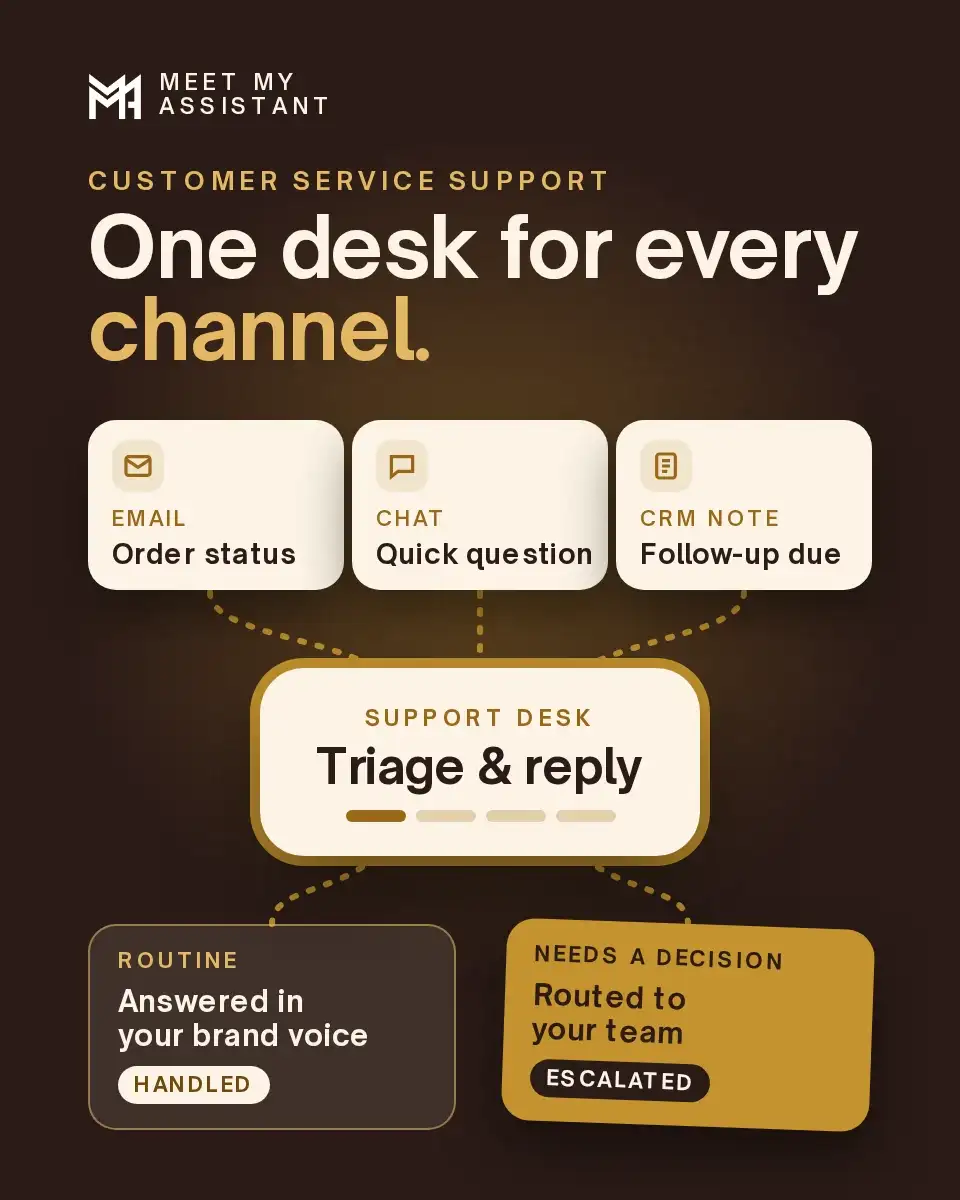
Meet My Assistant staffs this seat in three channels: email, chat, and CRM notes. Day-to-day client interactions stay there. In each one, the assistant handles inbox and ticket triage, client follow-ups and status updates, appointment scheduling and reminders, and friendly, brand-aligned communication.
Want the task-by-task handoff plan first? Read what a customer service virtual assistant does.
Email
Email is the inbox and the ticket queue clients already use. The assistant triages the thread, sends the follow-up or the status update, and keeps the wording brand-aligned. Appointment scheduling and reminders go on that same thread when the booking rule is one your team already follows.
Chat
Chat carries the same client communication when the conversation starts in chat: a status update, a follow-up, or a reminder. Tone stays on-brand. When a human decision is required, the thread is routed to your team with the context still attached.
CRM notes
CRM notes and handoffs keep the conversation on the record your team already opens. Sales, ops, or leadership can see what was sent and what is waiting on them. The note is how the handoff travels.
Coverage Hours and Time Zones
Coverage is scheduled for your business hours. Flexible coverage, as volume rises or dips, is already part of this service. On the discovery call, name the hours the queue should run. The assistant is matched to that window.
The default overlap is the US Eastern and Central business day, for companies that want English and Spanish coverage on that clock. Assistants live and work in Latin America. The time-zone overlap lets them work during US business hours (benefits of hiring a virtual assistant). Hours outside that overlap are set on the discovery call.
Escalation and Handoffs
Escalation routing when a human decision is required is part of the seat. The assistant owns the follow-up, the status update, and the reminder.
Those handoffs are aimed at sales, ops, or leadership. A Customer Success Manager supports the assistant after onboarding, so the path stays accountable when volume changes. You still approve who is placed.
Leads and pipeline work are a different service. Sales support is prospecting, inbound replies, appointment setting, follow-up, and CRM management under US-managed oversight. Customer service support is client communication for the customers your business is already serving.
Practices that need patient scheduling, records updates, and insurance follow-up hire on the healthcare virtual assistant page, where licensed staff keep clinical care. Customer service support remains the commercial client queue.
Routine
Routine questions are handled promptly.
Urgent
Urgent issues reach you.
Decision
A decision that belongs to someone on your team comes back to that person with a CRM note.
Tools Your Assistant Works In
The assistant joins the tools you already run, after you grant access. That includes Google Workspace, Microsoft 365, and your CRM. You don't switch stacks. This seat uses them for email, chat, scheduling reminders, and CRM notes.
Google Workspace
Gmail and the shared documents around a client thread. The assistant works there once you grant access, using the tone and the escalation path set in onboarding.
Microsoft 365
Outlook, calendar reminders, and the files your team already keeps in Microsoft 365, when that is the system the queue lives in. Status updates and appointment reminders go out from that mailbox. Access is limited to what you grant.
Your CRM
CRM notes and handoffs are written in the CRM you already run. The assistant does not arrive with a replacement system. The record sales, ops, or leadership already opens is the record that receives the note.
Bilingual English-Spanish Support
This seat can be matched for English and Spanish client communication. Assistants are bilingual and college-educated, based in Latin America, for US companies that want English/Spanish coverage on the Eastern or Central business day. Tell us on the discovery call if clients write in both languages.
Replies in English and Spanish
Follow-ups, status updates, and reminders can run in the language that client relationship already uses. You set the tone. The assistant stays inside the wording you approved for the brand.
Same channels either way
Email, chat, and CRM notes stay the channels when a client writes in Spanish. The CRM note can record which language the thread used, so the next person on your team sees it.
The same escalation path
A human decision is routed to your team in either language. The Customer Success Manager on the account is the same person either way.
How it works
How Hiring Works
The steps are how US-managed hiring works. Map the queue before anyone is placed.
We map the channels, the business hours, the tools, and which messages need a person on your team. That brief is what sourcing uses.
You meet pre-screened candidates and choose the person. Placement happens after you approve them.
Access, brand tone, and the escalation path are documented so the assistant starts in the email, the chat, and the CRM you named. Onboarding puts a Customer Success Manager on the account, including when volume rises or dips.
FAQ
FAQ
Email, chat, and CRM notes. The seat covers inbox and ticket triage, client follow-ups and status updates, appointment scheduling and reminders, and CRM handoffs. Escalation routing applies when a human decision is required.
Your business hours. Assistants are based in Latin America and work US business hours, overlapping the Eastern and Central business day by default. Hours outside that window are set on the discovery call.
Book a discovery call. We map channels, hours, and which messages need someone on your team. You interview a pre-screened assistant. Onboarding puts a Customer Success Manager on the account.
Why Choose Meet My Assistant?
Every assistant is pre-screened and supported by a Customer Success Manager, so service quality stays accountable after onboarding — not just during the honeymoon week.
Book a discovery call to find the right customer service virtual assistant for your team, or call (786) 859-8131.