Blog
Customer Service Virtual Assistant: What to Hand Off First
October 22, 2026 · Mauricio Montaldo
A customer service virtual assistant answers the customers you already have: a moved appointment, a job status, and the message that has been sitting since yesterday. Give them the inbox first, then the ticket queue, then the follow-ups, and keep refunds, exceptions, and policy calls with you.
- Top 1% applicants
- Time-zone aligned
- 98% retention
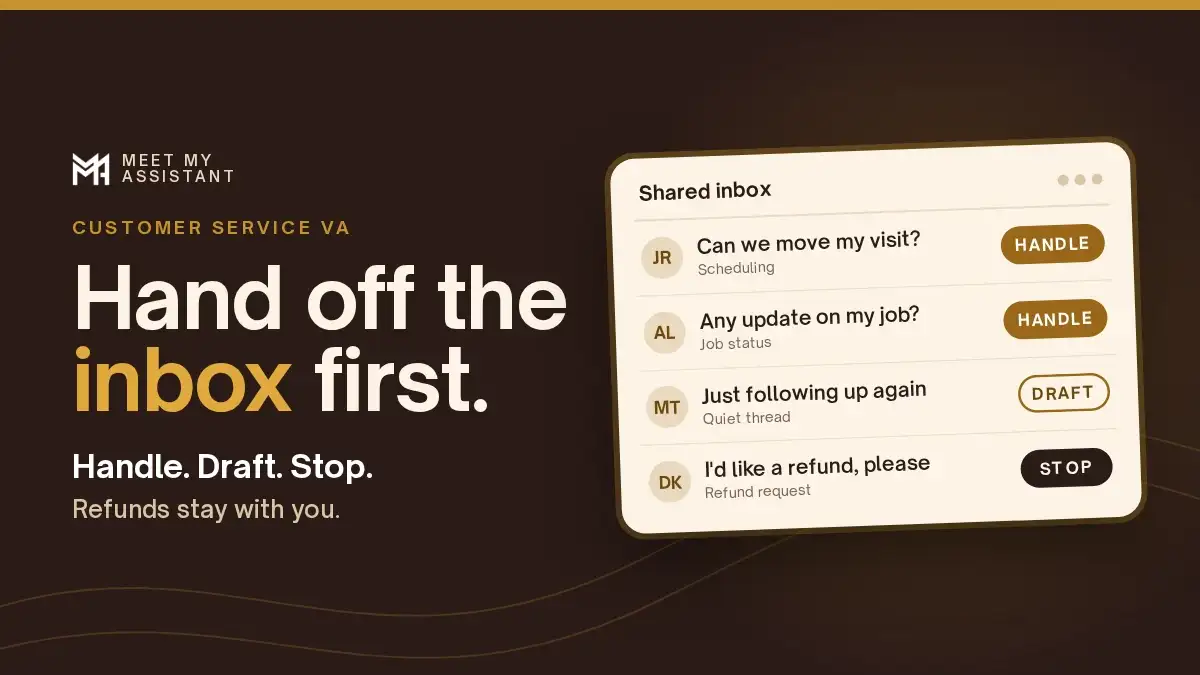
Those threads are real work, and they can follow a script once the script exists. The owner still decides anything that changes money or bends a rule. The assistant sends the answers you already approved, in your voice, and stops when the thread leaves that page.
The seat for that queue is covered on customer service virtual assistant services. Assistants in that role are college-educated, and a Customer Success Manager stays on the account after onboarding. This guide is the handoff itself: what they own, what stays on your desk, and how the first 30 days should go.
What a customer service virtual assistant actually owns
Use one test. If the answer is already in your policy, your calendar, or the last note on the job, the assistant can send it. If the answer changes money, makes an exception, or writes a new rule, it comes back to you.
On a normal week, a customer support virtual assistant owns work like this:
- Reading the shared inbox and sorting routine questions from threads that need you
- First replies in language you approved: appointment time, arrival window, job status, and "we received this"
- Updating the ticket or the job note so the next person can see what was already said
- Scheduling and reminders, once the hours, the travel buffer, and the cancellation window are written down
- Follow-up on threads that went quiet, on a cadence you set, still inside the same script
- A clear note when a thread has to stop and wait for you
Meet My Assistant assistants are bilingual in English and Spanish. If customers write in both, put a sample reply in each language in the week-one packet. The assistant should send the language the customer used, from the samples you approved.
Start in the inbox and the ticket tool you already run. Grant access after the rule sheet exists, and grant only the access that lets them read and answer the queue you named.
New leads that have not bought yet are a different queue. The first reply to an inquiry, the sales note, and booking a sales conversation belong in the sales virtual assistant lead follow-up guide. Keep that work off this seat until the existing-customer inbox is steady. If one person must cover both, give them two rule sheets and two labels in the inbox, so a pricing question does not get a support script.
Calendar, documents, and internal coordination belong with a virtual administrative assistant. Customer service is the thread a customer opened. Admin is the work that never needed a customer to write in.
What stays with you: refunds, exceptions and policy calls
Speed is useful only when the promise is one you meant to make. These decisions stay with the owner:
- Refunds, credits, and waiving a fee
- An exception to a written policy, including a one-time "we will cover it"
- A change to the policy itself: the warranty, the cancellation window, what a revisit costs
- A complaint that asks you to admit fault, or that mentions a lawyer, a review site, or a safety problem
- Any promise the approved replies do not already contain
A policy call is the moment a customer asks you to change the rule, or to say what the rule means in their case. The assistant can collect the facts, write them on the ticket, and tell the customer you will answer. You make the call.
A licensed practice draws the same line. In a law firm, calendar, intake, and file chase can move to an assistant, and the advice stays with the lawyer. That handoff is mapped in how a legal VA recovers billable hours.
If you want a small refund to be routine, write the condition yourself: the situation, the limit, and who still hears about it. Until that sentence is on the rule sheet, every refund waits for you. The assistant should not guess a number that "seems fair."
The same line covers tone. A calm status update can go out on the script. An apology that offers money, a free return visit, or a change in how you do the work waits for your send.
Setting escalation rules before day one
Write one page before you share a password. Three buckets are enough, and the assistant should be able to sort a thread into one of them without asking you what the buckets mean.
Handle. The answer is in the script. The assistant sends it, logs it, and moves on.
Draft. The thread is close to the script and still needs your eye. They write the reply and you send it. For the first two weeks, you can put every live reply in this bucket so you hear the voice before customers do.
Stop. Refunds, exceptions, policy questions, an angry thread, a request to speak with you, or a conversation that has gone back and forth twice without a resolution. They stop, note the facts, and ping one named person the same day.
Name the person and the channel. A group chat that everyone can see and nobody owns turns a same-day ping into tomorrow. Write what "same day" means on your calendar, including what happens after your posted hours: send the holding line you approved, and put the decision at the top of your next open block.
Also write the sentences they never send. A discount you did not approve, a guarantee, a date the schedule cannot keep, and blame aimed at a technician or a vendor all belong on that list. If it is not in the approved replies, it is a draft or a stop.
Five lines are enough for the page:
- Who counts as an existing customer for this queue
- The replies you approve, in the languages your customers actually use
- The hours you answer, and what happens after those hours
- The three buckets, with two examples in each
- The name and channel for a stop
Review a handful of sent replies in the first month. Voice drifts toward whatever the last tense thread rewarded. The review is how you catch the drift while the queue is still small.
The first 30 days: inbox, then tickets, then follow-ups
Hand over one queue at a time. A virtual assistant for customer service learns your voice on real threads, and a second queue on day one hides whether the first one is working.
Week 1 — Access and the rule sheet. Open the shared inbox, the ticket tool, and the calendar with the least access that still lets them read live threads. Give them the one-page brief. They draft. You send. This week is for finding holes in the script while you are still the person who hits send.
Week 2 — The inbox goes live. They send on the shared inbox only. Tickets and outbound follow-up wait. You read what went out. When a real thread finds a hole, fix the script that week, not in a note you mean to write later. By Friday you should be able to point at the inbox and name who answered it.
Week 3 — Tickets. Move the same rules into the ticket queue you already use: status updates, scheduling inside the written window, and notes the next person can read in a minute. The inbox habit should already feel routine. If it does not, stay on the inbox. A second queue will not make the first one clear.
Week 4 — Follow-ups. Quiet threads get a check-in on the cadence you wrote: one note, a last note, then a stop. The assistant does not invent a new offer to restart the thread. Then read a sample of the month with your Customer Success Manager: speed against the window you set, tone against the samples, and whether stop-bucket items actually reached you. Fix the rule sheet before you add another channel, such as chat or a second brand inbox.
That order is the whole plan. Inbox, then tickets, then follow-ups. Each week has a thing you can see: drafts you sent, replies that match the script, tickets with a note, and follow-ups that stopped where you said to stop.
When you can name who answers that inbox, the handoff has started. The scope for this seat, and the way to book a call about it, is with our customer service support team.
FAQ
Frequently asked questions
Existing-customer replies that follow a script you wrote: inbox sorting, status updates, scheduling inside your rules, ticket notes, and follow-ups on quiet threads. The day-to-day list for this seat is on customer service VA support.
You do, unless the rule sheet already states the condition that makes it routine. Until that sentence exists, the assistant gathers the facts, logs them, and pings you the same day.
Lead follow-up is for people who have inquired and have not bought. That handoff sits in the sales virtual assistant lead follow-up guide. This role is for customers you already have.
A shared inbox, approved replies, the three buckets (handle, draft, and stop), and one named person for stop-bucket pings. Share access after that page exists.